YOUR SERVER. YOUR MAIL.

Your mail server.
Your controls.
A clearer view.

Domains, mailboxes and mail filtering, together in one self-hosted appliance. Built for administrators who want to run their own mail.
Open source · AGPL-3.0 · Debian 13

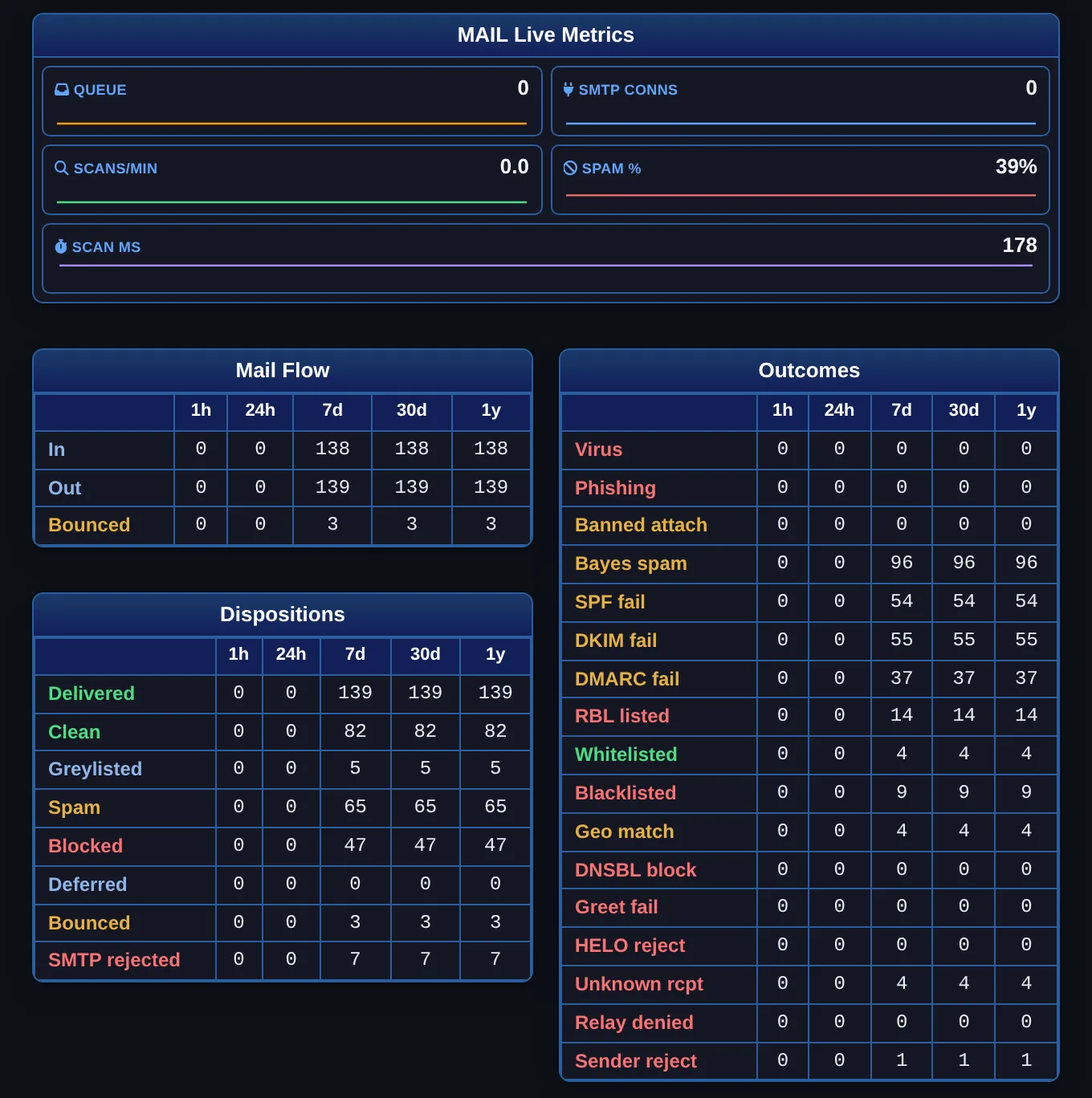
MailtronX / Mail Metrics CONSOLE PREVIEW
Mail Metrics page: live queue, SMTP connections, scans per minute, spam share and scan time, with the Mail Flow, Dispositions and Outcomes tables for 1 hour to 1 year
Follow the queue. Review the outcomes. See the full picture. View full screenshot →
Built on established mail softwarePostfixrspamdClamAVDovecot

MAIL ADMINISTRATION, TOGETHER

Run your mail.
Keep your bearings.

One console for the mail services, the policies you set and the outcomes you need to understand.

03 / VISIBILITY

Know how
mail is moving.

Follow live mail metrics, delivery outcomes and trends from the last hour to the last year.

See the reporting →

INSIDE THE APPLIANCE

A working console.
A clear view of your mail.

Real screens from MailtronX. Inspect services, review mail outcomes and manage the blocklists at the SMTP door.
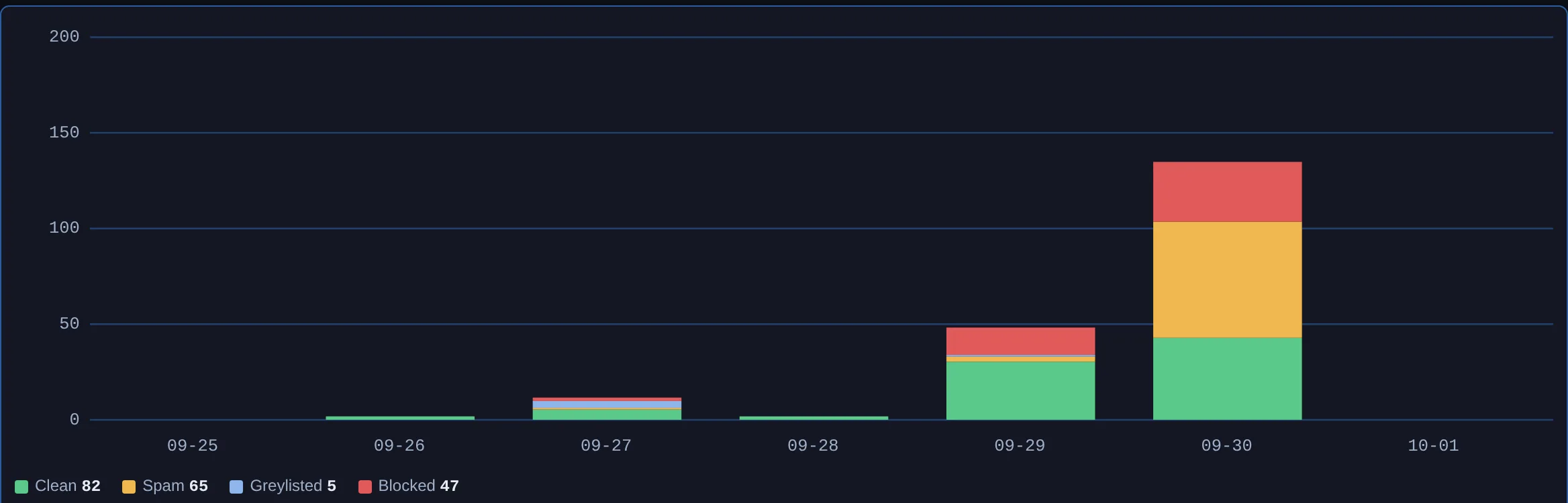
Statistics page: stacked bar chart of scan verdicts per day
Mail outcomes over timeReview scan verdicts and delivery results in server-rendered reports.
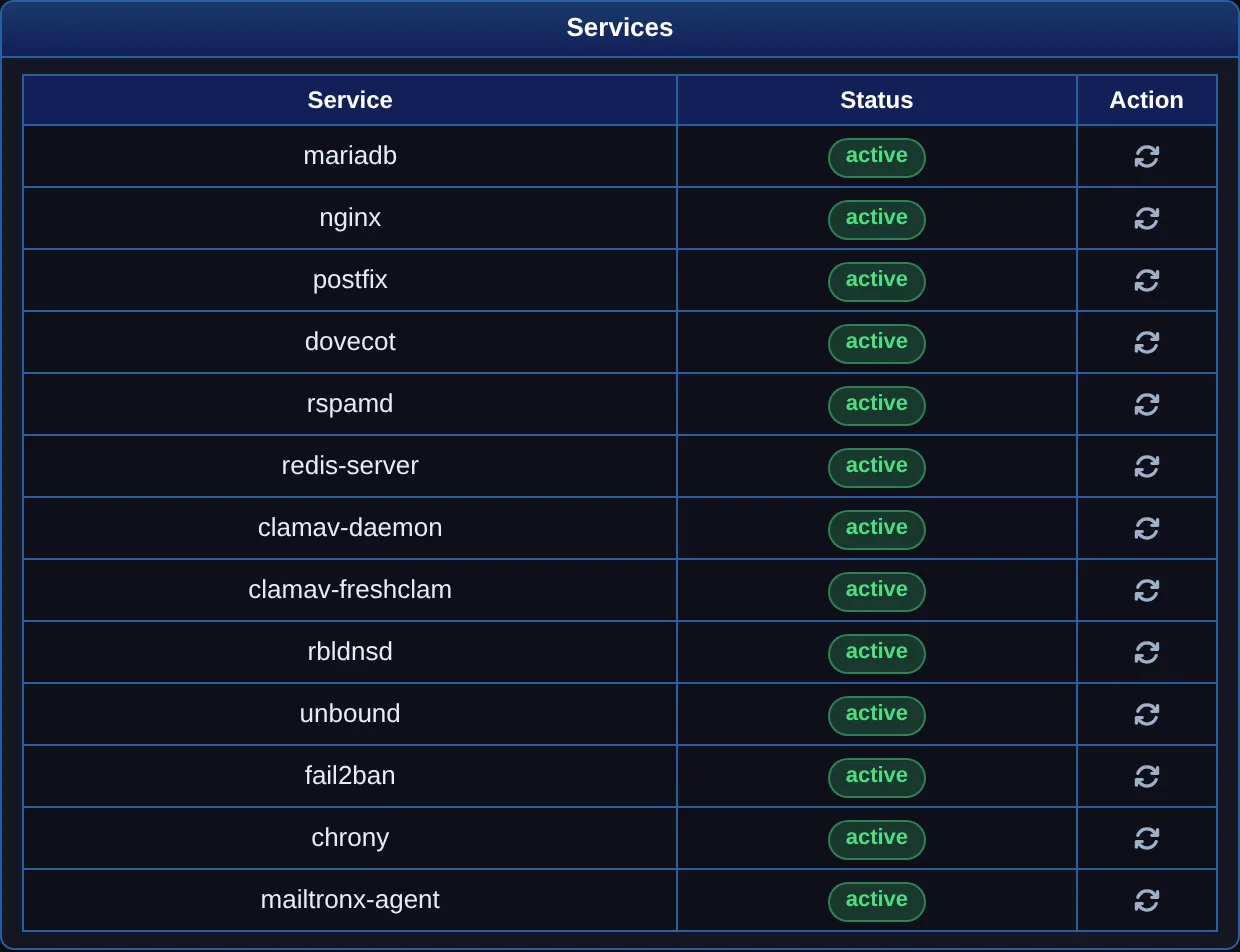
Services panel: thirteen mail-path services with status and a restart button each
Services: every mail-path service, status and restart.
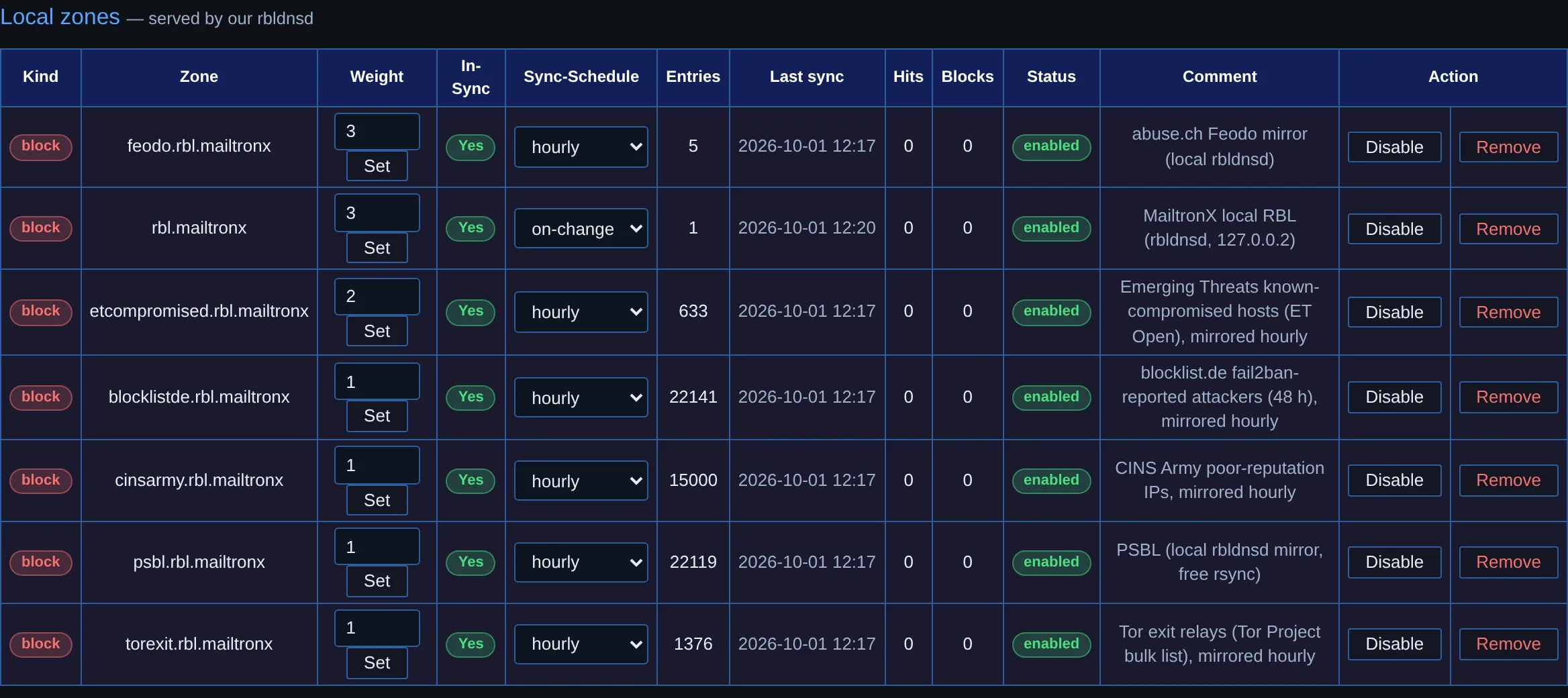
RBL / DNSBL Zones page: the local zones served by the appliance with weight, sync schedule, entries, last sync, hits and blocks
RBL management: your own zone and the mirrored feeds, each with its weight at the SMTP door.
More console screenshots Dashboard, time synchronisation and counters
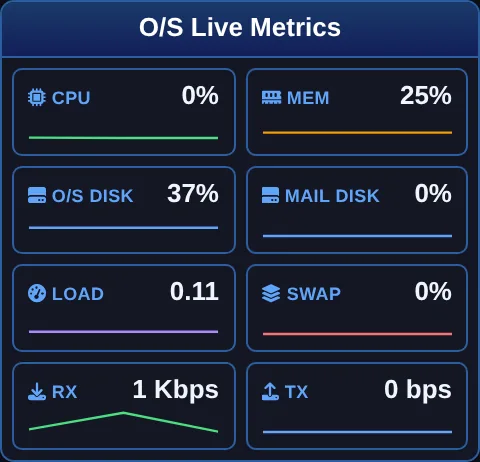
O/S Live Metrics tiles with sparklines
Dashboard: one-second O/S metrics with sparklines.
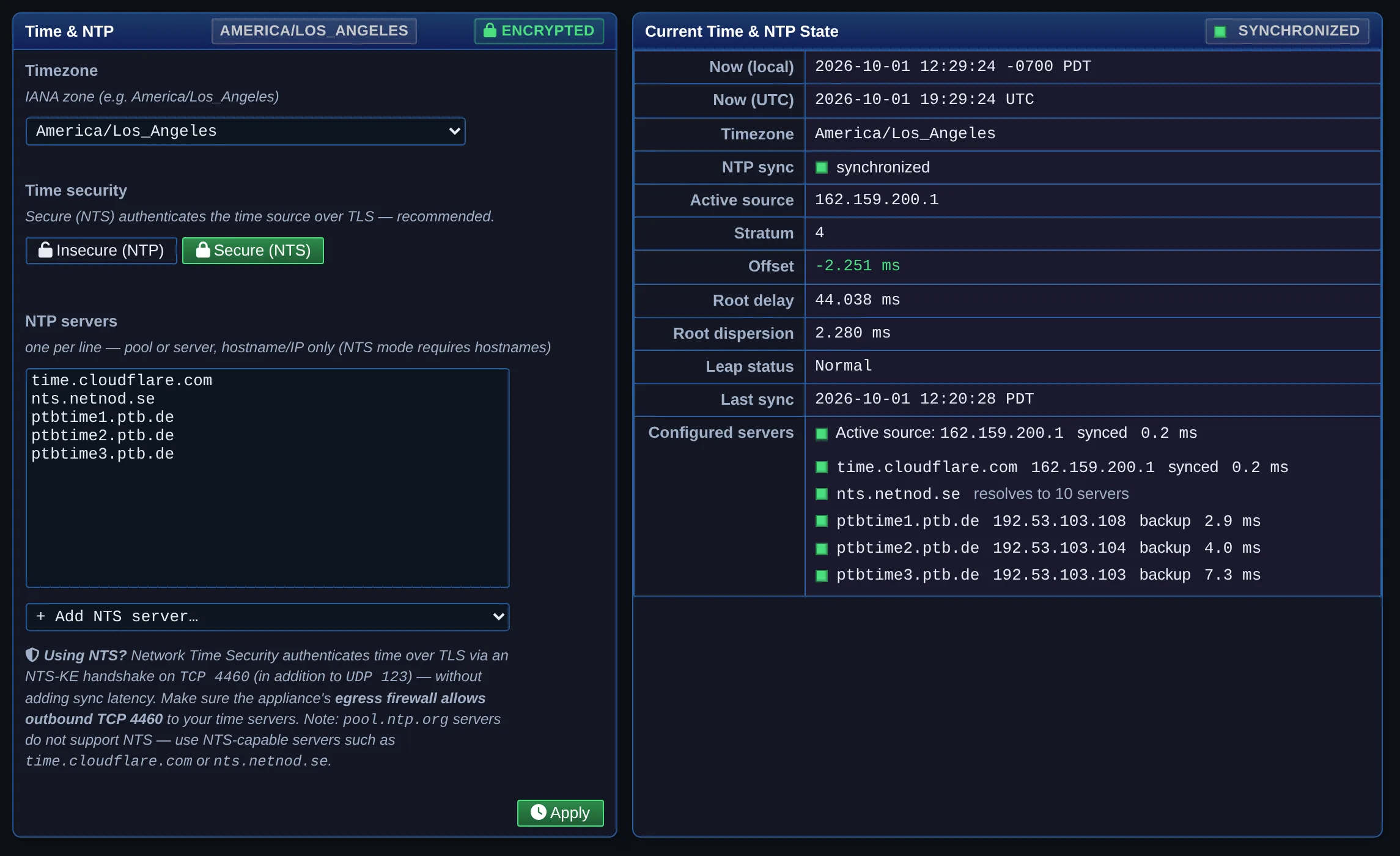
Date & Time / NTP page: time zone, authenticated NTS time sources and the live synchronisation state
Date & Time: authenticated NTS sources and the live synchronisation state.
Statistics counters: messages scanned, treated as spam, treated as ham, rejected at SMTP, in quarantine, viruses blocked, Bayes learned
Statistics: the scanner's cumulative counters.

BEYOND THE INBOX

The everyday work
of running a mail server.

Mail administration includes the host underneath it. Keep those controls within reach.

See the complete feature set →

Secure the administration

HTTPS, role-based access, LDAP / Active Directory sign-in, API tokens and an audit trail of changes.

Back up and keep current

Encrypted configuration snapshots, full-appliance backups and signed, verified software updates.

Check the domain and the host

Domain SMTP validation, certificate management, service status and system metrics in the console.

UNDER THE HOOD

An established stack.
An inspectable mail path.

Mail-processing services run on the appliance. DNS and reputation checks, updates, certificate issuance and optional diagnostics contact external services. Read the privacy details →

01 / RECEIVEPostfix

Connection checks and SMTP policies

02 / FILTERrspamd + ClamAV

Spam scoring and antivirus scanning

03 / DELIVERDovecot

Mailbox delivery, quotas and IMAP

Explore the complete mail flow Inbound, outbound and every supporting package

Inbound

Senderany mail server on the Internet, port 25
nftablesdefault-drop firewall; Spamhaus DROP netblocks dropped on every port
Postfix postscreenweighted DNSBL vote before the greeting: own zone and mirrored feeds answered by rbldnsd, public lists through unbound; pre-greet test
Postfix smtpdHELO must be a valid FQDN, sender and recipient domains must exist, relay only for your networks; recipients, routes and lists read live from MariaDB
rspamdSPF, DKIM, DMARC, ARC; Bayes, fuzzy, neural, reputation; RBL, URL and phishing lists; rate limits, greylisting, your lists and country scores; ClamAV on every part; oletools on office files; state in Redis
Verdictreject at score 12, greylist at 4, tag at 6, or clean; every outcome counted
Postfix queueforwardings, BCC copies and the archive address applied; deferred mail retried
Dovecotdelivery over LMTP, quota enforced, tagged mail filed in the Quarantine folder by Sieve
Mailboxread over IMAP with the mailbox's own password

Outbound

Mail clientdesktop or phone app
Postfix submissionports 587 and 465, TLS required; the client authenticates through Dovecot SASL and may send only as its own mailbox
MailtronX policy servicethe quota group's sending limits per hour, day and week, checked at the end of every message
rspamdthe same scan as inbound, then the DKIM signature for the sending domain
Postfix smtproute per domain or recipient, relay host or sender relay with credentials, or direct delivery; all from MariaDB
Recipient serverTLS when the other side offers it

Around the path

MariaDBevery setting; the mail server reads its maps from it live, and every managed file is regenerated from it
RedisBayes, fuzzy hashes, reputation, rate-limit buckets, scan history
rbldnsdserves the appliance's own blocklist zone and the hourly mirrors of six public feeds
unboundthe appliance's own recursive resolver for public blocklist lookups
dnsmasqroutes blocklist zones to rbldnsd and unbound, everything else upstream
ClamAVantivirus daemon; freshclam keeps the signatures current
oletoolsoffice-macro analysis behind the olefy daemon
chronyauthenticated NTS time sources
rsyslogevery log line, forwarded over TLS, TCP or UDP if you want
fail2banbans brute-force sources
auditdsystem auditing
nginxTLS for the console and the ACME challenge path
MailtronX consolethe dashboard, every configuration page, the API and the audit trail

START WITH YOUR SERVER

Make it your
mail appliance.

Install on a fresh Debian 13 server. The bootstrap verifies the signed release and package checksum before installation.

Installation guide

CURRENT RELEASE 0.25.25

curl -fsSL https://mailtronx.com/install.sh | sudo bash
  • Fresh Debian 13 · 64-bit · root access
  • 2 GB RAM minimum
  • Public DNS name and reachable mail ports
Read the full requirements before installing →

Free and open source. MailtronX is licensed under AGPL-3.0. Licence details

Single-server deployment today. Docker, VM images and fleet synchronisation are planned. RBL and roadmap